




Low-code has moved from a tactical shortcut to a mainstream enterprise development model. Gartner forecast that by 2025, 70% of new applications developed by organizations would use low-code or no-code technologies, up from less than 25% in 2020. Gartner also projected that low-code development tools would account for 75% of new application development by 2026, up from 40% in 2021.
The market is growing at the same time. Gartner forecast the worldwide low-code development technologies market to reach $44.5 billion by 2026, driven by factors including technology talent shortages, citizen development, automation and the pressure to deliver applications faster.
But market growth does not mean every platform is equally equipped for enterprise-scale development. The more useful question is therefore not simply “Is low-code fast?” but “Can this platform deliver speed without compromising enterprise control?” This guide looks at what OutSystems is, how it works, how to approach building an application with it, and – just as importantly – where its limitations sit. The goal isn’t to sell the platform. It’s to give technology leaders enough context to evaluate it honestly.
What Is OutSystems?
OutSystems is an enterprise low-code development platform that combines a visual, model-driven development environment with AI-assisted tooling to help organizations build, deploy, and manage web and mobile applications across their full lifecycle. It sits at the “high-productivity” end of the low-code market – alongside platforms like Mendix and Appian – distinguished by a full visual IDE (Service Studio), a component marketplace (Forge), and deployment flexibility across on-premises, private cloud, and OutSystems Cloud.
Unlike simpler no-code tools aimed at business users building departmental workflows, it is designed to support professional development teams building core, business-critical applications – including legacy modernization, customer portals, and internal systems that integrate with ERP, CRM, and other enterprise platforms. That positioning matters: it’s the reason the platform shows up in enterprise architecture conversations rather than purely departmental “shadow IT” tool lists, though – as covered below – it can end up in either category depending on how it’s governed.
More recently, the platform has extended toward agentic application development, adding AI-assisted generation tooling and agent lifecycle management alongside its established low-code core. That shift reflects a broader pattern across the low-code market: platforms are increasingly expected to support AI-driven components, not just traditional forms-and-workflow applications.
How Does OutSystems Work?
The platform abstracts most of the repetitive, boilerplate work of application development into visual models, while still allowing custom code where the platform’s abstractions aren’t sufficient. In practical terms, the platform is built around a handful of core concepts:
- Visual development – application logic, screens, and data flows are built and edited in a visual canvas rather than hand-written line by line.
- Reusable components – teams build (or pull from the Forge marketplace) modules that can be shared across applications, reducing duplicated work.
- Data models – entities, relationships, and business data structures are defined visually and generate the underlying schema.
- Logic and workflows – business rules, integrations, and process flows are modeled rather than scripted from scratch.
- UI development – responsive web and native mobile interfaces are assembled from templates and components, with customization available where needed.
- Integrations and APIs – connectors and API generation tools link applications to existing enterprise systems.
- Deployment and lifecycle management – built-in tooling manages promotion across environments (development, testing, production) and ongoing version control.
A useful way to think about the platform end to end is as a cycle rather than a one-time build: Design → Build → Integrate → Test → Deploy → Monitor → Improve.
That loop matters for enterprise buyers specifically because it’s the “monitor and improve” stages – not the initial build – where a lot of low-code initiatives quietly accumulate risk if they aren’t planned for from the outset.
How to Build an Application with OutSystems
For a technology leader evaluating fit, it helps to understand the shape of the delivery process rather than the specific button clicks. At a senior level, building an application on OutSystems typically follows eight stages.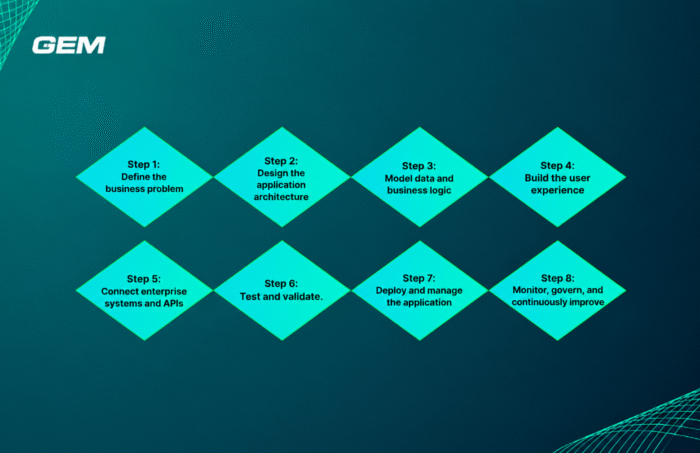
- Step 1: Define the business problem. Before any modeling begins, the team should be explicit about the business outcome the application needs to deliver, who will use it, and what “done” looks like. Skipping this step is the most common reason low-code projects sprawl in scope.
- Step 2: Design the application architecture. Even on a visual platform, architectural decisions – how the application is modularized, what it depends on, how it will scale – need to be made deliberately rather than left to whatever the visual designer defaults to.
- Step 3: Model data and business logic. Data entities, relationships, and core business rules are defined visually. This is where much of the platform’s productivity gain comes from, but it’s also where inconsistent naming, duplicated entities, and poor data modeling practices can quietly create long-term maintenance debt if standards aren’t enforced.
- Step 4: Build the user experience. Screens and interaction flows are assembled from responsive templates and reusable UI patterns, with custom styling and components layered in as needed for brand and usability requirements.
- Step 5: Connect enterprise systems and APIs. Most enterprise applications aren’t standalone – they need to talk to ERP, CRM, identity, and legacy systems. This step is often the real complexity driver in this kind of project, regardless of how fast the visual build itself goes.
- Step 6: Test and validate. Automated and manual testing should cover both the generated application logic and any custom code or integrations, with particular attention to integration points, which tend to be where defects concentrate.
- Step 7: Deploy and manage the application. The platform supports promotion across development, testing, and production environments with built-in lifecycle tooling, but the surrounding process – change approvals, release cadence, rollback plans – is an organizational decision, not something the platform enforces on its own.
- Step 8: Monitor, govern, and continuously improve. Once live, applications need ownership, performance monitoring, and a plan for ongoing enhancement – the stage where many low-code initiatives either mature into sustainable assets or turn into unmanaged technical debt.
The pattern across all eight steps: the platform accelerates the mechanical work of each stage, but it doesn’t remove the need for the judgment, standards, and planning that separate a well-run enterprise application from a fast prototype that never should have reached production.
Why Governance Matters in Low-Code Development
This is the section most low-code content skips, and it’s arguably the one that matters most to a CIO’s decision. Low-code platforms lower the barrier to building applications – which is exactly why, without governance, they can also accelerate the problems enterprises already have with uncontrolled application sprawl: shadow IT, duplicated applications solving the same problem in different departments, inconsistent architecture between teams, security gaps introduced by well-meaning but under-trained builders, integration complexity as more systems get connected ad hoc, technical debt, unclear ownership when the original builder moves on, and poor lifecycle management once the initial enthusiasm fades.
None of this is unique to the platform – it’s the risk profile of low-code adoption generally. What differs is whether the platform and the organization around it are equipped to manage it. An enterprise-grade approach to low-code governance typically addresses:
- Architecture standards – shared conventions for how applications are structured and modularized.
- Security controls and access management – consistent authentication, authorization, and data-handling standards across applications, not decided ad hoc per project.
- Environment management and deployment governance – controlled promotion paths from development through production, with appropriate approvals.
- Reusable components – a managed library, rather than every team rebuilding the same logic independently.
- Application lifecycle management – clear ownership, monitoring, and a defined path for retiring or consolidating applications.
- Documentation and change management – so that applications remain maintainable as the team around them changes.
The underlying message worth repeating to any business stakeholder pushing for speed above all else: low-code should accelerate development without lowering the standards expected from enterprise software. A platform can make governance easier to enforce – through centralized environment management and reusable component libraries, for instance – but it can’t substitute for an organization actually deciding to enforce it.
Choosing a low-code platform? Compare the leading platforms by governance, scalability, and enterprise readiness: Top 8 Low-Code, No-Code Platforms Reshaping Software Delivery in 2026
Is OutSystems Suitable for Enterprise Applications?
On balance, yes – with the usual caveats that apply to any enterprise platform decision. OutSystems is designed to support enterprise-grade security, deployment flexibility (on-premises, private cloud, or OutSystems Cloud across major hyperscalers), and integration with existing systems. It can support applications ranging from internal tools to customer-facing, business-critical systems.
But “designed to support” enterprise requirements and “automatically satisfies” them are different claims. Whether a given implementation meets an organization’s specific security, compliance, and scalability requirements depends on architecture and implementation decisions made during the build – data residency choices, identity integration, environment segregation, and how rigorously governance standards are actually applied. Organizations with strict regulatory requirements should validate specific compliance capabilities against their own obligations rather than assuming platform-level certification covers every use case.
What Are the Limitations of OutSystems?
A balanced evaluation has to include where OutSystems may not be the right choice, or where adoption carries real trade-offs:
- Platform dependency. Applications built here run within its own model and runtime. Migrating away, or integrating deeply with highly specialized custom infrastructure, is a more involved undertaking than with some traditional stacks.
- Licensing economics. Enterprise low-code licensing scales with usage and application complexity; organizations should model total cost of ownership across the application portfolio, not just the cost of the first project.
- Skills requirements. Productivity gains depend on teams that understand both the platform’s model-driven paradigm and sound architecture practices – treating it as “no training needed” tends to produce exactly the governance problems discussed above.
- Architectural and customization boundaries. For applications requiring highly specialized, low-level engineering – unusual performance optimization, deep platform independence requirements, or extreme UI customization outside the platform’s component model – traditional development may remain the better fit.
- Governance overhead. The governance capabilities that make the platform enterprise-appropriate only pay off if an organization invests in setting them up; skipping that step erodes much of the advantage.
- Migration and integration considerations. Bringing an existing application estate onto the platform, or integrating with legacy systems that weren’t designed for modern API access, can add meaningful project complexity regardless of how fast the low-code build itself is.
None of these are unusual for an enterprise platform decision – they’re the standard set of considerations that should sit alongside any adoption business case.
OutSystems vs Traditional Development
| Dimension | Traditional Development | OutSystems / Low-Code |
| Development speed | Slower; every component hand-built | Faster for standard application patterns, especially CRUD-heavy and workflow apps |
| Developer experience | Full control over code and tooling | Visual, model-driven; less line-by-line control, faster iteration |
| Reusability | Depends on team discipline and internal frameworks | Built-in component reuse via shared modules and the Forge marketplace |
| Integration | Fully custom, maximum flexibility | Pre-built connectors accelerate common integrations; complex or unusual integrations still require custom work |
| Governance | Entirely dependent on internal standards and enforcement | Platform provides environment and lifecycle tooling; still requires organizational governance to be effective |
| Scalability | Depends on architecture chosen and engineering effort invested | Designed to support enterprise-scale applications, subject to sound architecture within the platform |
| Customization | Effectively unlimited | High, but bounded by the platform’s model and component architecture |
| Maintenance | Fully owned by internal engineering practices | Simplified for standard patterns; custom extensions still require skilled maintenance |
| Best-fit use cases | Highly specialized, performance-critical, or platform-independent systems | Business applications, legacy modernization, portals, and systems where delivery speed and consistency matter most |
The right choice depends on application complexity, organizational capabilities, governance requirements, and business objectives – not a universal winner.
When Should a Business Use OutSystems?
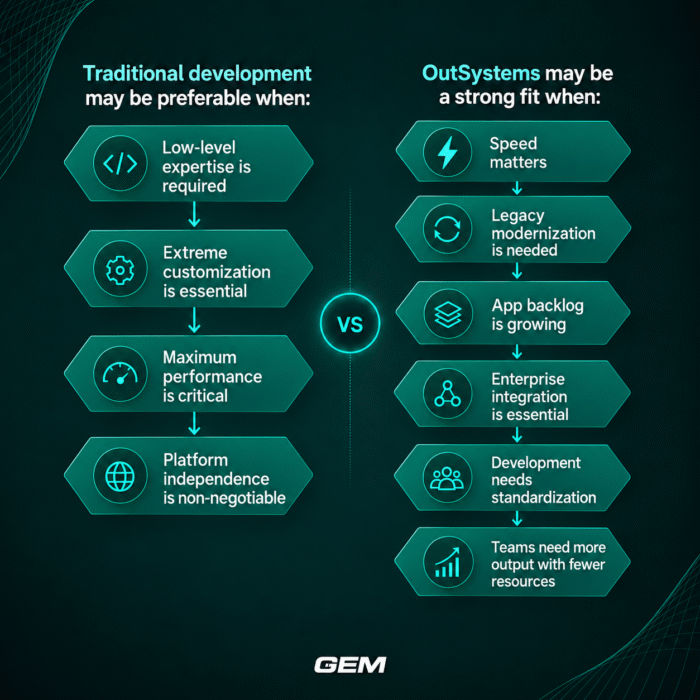
OutSystems may be a strong fit when:
- Application delivery speed is a genuine business priority, not just a preference
- The organization needs to modernize legacy applications without a full rebuild
- There’s a backlog of business applications competing for limited engineering capacity
- Integration with multiple enterprise systems is a core requirement
- IT leadership wants to standardize development practices across teams
- Development teams need to deliver more with constrained headcount
Traditional development may remain preferable when:
- The workload requires highly specialized, low-level engineering
- Extreme customization outside standard application patterns is essential
- Performance optimization needs are unusually demanding
- Platform independence is a critical, non-negotiable requirement
Moving from “Should We Use Low-Code?” to “Where Does It Create Value?”
The more useful question for most enterprises isn’t whether OutSystems is good or bad in the abstract – it’s where, specifically, low-code delivery can create measurable value inside an organization’s own application portfolio, and what governance model needs to be in place before that delivery scales past a single project.
For technology leaders weighing that question, a structured conversation with an experienced delivery partner is often the fastest way to separate genuine opportunity from platform hype – covering everything from a modernization roadmap for an existing application estate to the governance model needed to keep a growing low-code portfolio under control. GEM works with enterprise teams on exactly that kind of evaluation, from initial platform assessment through implementation and ongoing application lifecycle support.
Access to a capable platform is rarely the constraint. The harder questions are usually: what should be built first, what should be modernized versus rebuilt, how should new applications integrate with the existing systems landscape, what governance model will actually get followed once the initial project ends, and how does delivery scale beyond a single pilot application.
This is where an experienced implementation partner tends to add the most value – not by making the platform faster, but by bringing the architecture judgment, governance discipline, and delivery experience that determine whether a low-code initiative becomes a durable capability or a short-lived pilot.
GEM Corporation – Your AI-Native Implementation Partner

Across GEM’s low-code and application modernization engagements, clients typically see cost reductions in the 20-45% range on the applications modernized onto the platform, delivery timelines 40-70% faster than an equivalent traditional rebuild, and productivity gains of two to five times in the workflows the new OutSystems-based layer touches – without needing to commit to replacing the surrounding legacy estate in one move.
In practice, that plays out in three phases rather than one leap. A short discovery phase maps the existing application backlog, integration points, and governance requirements, and identifies which candidates are genuinely well-suited to low-code delivery versus which still warrant traditional engineering. A pilot – one workflow, one business unit, or one customer-facing application – is then built and proven on OutSystems within a single quarter, using the governance model (environment standards, component reuse, access controls) established during discovery rather than improvised along the way.
Only once that pattern is validated does delivery extend application by application into a scale phase, with legacy systems retired progressively as their functionality genuinely migrates across – not against a fixed calendar. Each stage is a funded, reversible decision, not one irreversible platform bet made upfront.
GEM works as an extension of the internal team throughout, not a black-box vendor: ISO 9001 and ISO 27001-certified delivery, CMMI Level 3 process maturity, and partnership-level experience with ServiceNow and Databricks give Melbourne and Sydney enterprises the audit trail regulators and boards now expect, alongside the delivery speed an AI-native approach to legacy modernization makes possible.
Conclusion
The question worth asking isn’t whether OutSystems is a good platform in the abstract – it’s how long an application backlog can keep growing, un-governed, before it becomes a bigger risk than the modernization project itself. Every quarter that backlog sits untouched is another quarter of duplicated departmental tools, inconsistent architecture between teams, and competitors who are already shipping faster on a governed low-code foundation.
None of that is an argument for adopting low-code everywhere, or for rushing a platform decision without proper evaluation. It’s an argument for starting with a structured assessment – on the organization’s own terms – rather than being forced into one later, under delivery pressure or after a governance failure has already made the case for you.
GEM’s low-code assessment maps the current application backlog, evaluates fit for OutSystems against traditional development, and scopes a phased delivery pathway for the applications that carry the most business value – with no obligation to commit to a platform-wide rollout, and no assumption that low-code is the right answer everywhere.
Talk to GEM about an OutSystems fit assessment for your organization.
Discover our low-code success story: 76% Faster Healthcare Compliance with CMDB: Building A More Secure IT Foundation
How long does it take to build an app with OutSystems?
Timelines vary widely by application complexity, integration requirements, and team experience with the platform. Low-code can meaningfully compress delivery time compared to traditional development for standard application patterns, but complex, deeply integrated applications still require proportionate planning and testing time.
Can OutSystems handle enterprise-scale applications?
Yes — OutSystems is designed to support enterprise-scale, business-critical applications, with deployment options across on-premises, private cloud, and OutSystems Cloud. Actual scalability outcomes depend on the architecture and implementation choices made during the build.
What can OutSystems integrate with?
OutSystems provides connectors and API tooling for integrating with common enterprise systems such as ERP, CRM, identity providers, and databases, along with the ability to build custom integrations for systems without pre-built connectors.
Is OutSystems secure enough for regulated industries?
The platform is designed to support enterprise-grade security controls, but organizations in regulated industries should validate specific compliance and data-residency requirements against their own regulatory obligations rather than assuming coverage by default.
What is the difference between OutSystems and Mendix?
Both are enterprise-grade, high-productivity low-code platforms with visual, model-driven development. They differ in areas such as tooling philosophy, component ecosystems, and specific deployment and AI-development capabilities — a decision between them should be based on a direct evaluation against the organization's specific requirements rather than general reputation.
Do you need developers to use OutSystems?
For business-critical enterprise applications, yes. While OutSystems lowers the coding burden, professional developers are still needed to handle architecture, complex integrations, custom logic, and governance — citizen developers can contribute within a properly governed framework, but shouldn't own critical applications unsupervised.
What are the biggest risks of adopting a low-code platform like OutSystems?
The main risks are organizational rather than technical: uncontrolled application sprawl, inconsistent architecture across teams, unclear application ownership, and governance that isn't established before adoption scales. The platform can support strong governance, but it doesn't enforce it automatically.