




Contents
- Why Enterprises Migrate Data: Strategic Drivers and Common Triggers
- 10 Risks That Undermine Data Migration Projects
- 1. Loss of critical data during transfer
- 2. Corrupted or incomplete records affecting data integrity
- 3. Inconsistent or duplicate data from source systems
- 4. Schema mismatches and data incompatibility
- 5. Unplanned downtime affecting business continuity
- 6. System slowdowns or degraded performance post-migration
- 7. Breakage in integrations with dependent systems
- 8. Exposure to data leaks or compliance violations
- 9. Governance blind spots from unclear ownership or access policies
- 10. Lack of user enablement and process readiness
- Mitigating Migration Risks: Practical Strategies for Enterprise IT
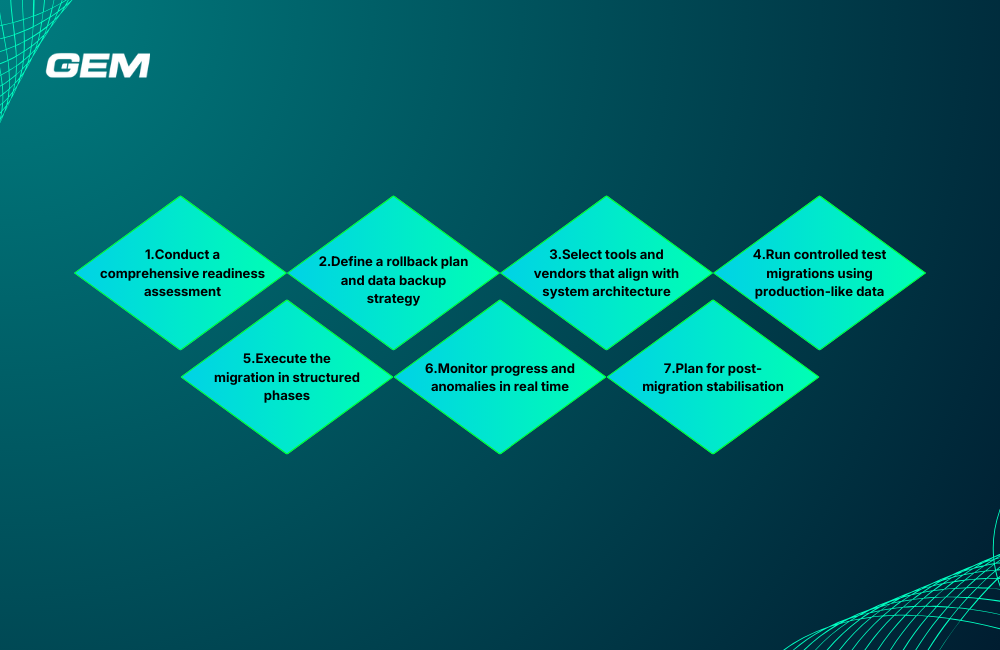
- 1. Conduct a comprehensive readiness assessment
- 2. Define a rollback plan and data backup strategy
- 3. Select tools and vendors that align with system architecture
- 4. Run controlled test migrations using production-like data
- 5. Execute the migration in structured phases
- 6. Monitor progress and anomalies in real time
- 7. Plan for post-migration stabilisation
- Validating Migrated Data: Techniques That Safeguard Accuracy
- Data Governance, Ownership, and Documentation During the Migration Process
- Migrating Enterprise Data with ServiceNow
- Lessons from the Field: Common Missteps and What to Learn from Them
- Conclusion
Poorly managed data migration can lead to service disruption, data quality issues, and regulatory exposure, especially when legacy systems, third-party vendors, or multiple departments are involved. This article outlines key data migration risks and mitigation strategies across technical, operational, and governance layers. It also covers data validation methods, post-migration support, and platform-specific guidance, including ServiceNow use cases.
Why Enterprises Migrate Data: Strategic Drivers and Common Triggers
In enterprise environments, data migration is rarely just a technical exercise, it’s often tied to broader goals such as modernisation, scalability, and operational efficiency. Whether part of a digital transformation program or a response to shifting regulatory requirements, migration typically reflects a need to align legacy data with new systems or business models.
Common triggers include:
- System upgrades: Replacing outdated platforms that no longer meet functional or security standards
- Cloud adoption: Moving from on-premise infrastructure to cloud-based environments
- Platform consolidation: Unifying data from multiple tools or business units into a centralised system
- Mergers and acquisitions: Integrating data from acquired entities to support unified reporting and operations
These efforts are often driven by strategic goals such as:
- Improved scalability to support growing data volumes and user demands
- Better performance through modern architectures and infrastructure
- Compliance alignment with evolving data protection and reporting standards
- Cost rationalisation by retiring legacy systems and reducing infrastructure overhead
According to Gartner, over 80% of data migration projects exceed their planned budgets or timelines due to risks that are not identified early. The Bloor Group reports that cost overruns average 30%, while time overruns reach 41%. These figures highlight the importance of understanding the business context behind migration, because strategic intent alone does not guarantee operational success.
Read more: Transform Raw Data into Business Value
10 Risks That Undermine Data Migration Projects
Even with strong planning, data migration projects can encounter execution challenges that delay delivery, degrade data quality, or impact downstream services. These risks often emerge from gaps in testing, unclear system dependencies, or misaligned governance.
1. Loss of critical data during transfer
This occurs when records are omitted, improperly mapped, or overwritten during migration, often without detection until after go-live. Data loss can affect transactional history, audit trails, or customer records.
Example: A global logistics firm lost shipment history when file-based migration scripts skipped archived tables due to misconfigured filters. Recovery required manual re-ingestion and reconciliation across multiple regions.
Why it matters: Lost data can’t be recovered if backups are missing or incomplete, leading to regulatory exposure and operational disruption.
2. Corrupted or incomplete records affecting data integrity
Corruption typically results from transformation errors, unsupported formats, or encoding mismatches. Incomplete records may pass basic checks but fail when used in application workflows.
Example: An insurance provider discovered that 20% of policy start dates were unreadable due to a timezone conversion bug during ETL. This affected pricing logic in the target system.
Why it matters: Corrupt records break validation rules and business logic, often requiring reprocessing and delaying system adoption.
3. Inconsistent or duplicate data from source systems
When existing systems contain inconsistencies, migration can amplify them, especially in multi-source scenarios. This results in mistrust across teams relying on the same data.
Example: After consolidating customer data from six regional CRMs, a telecom company ended up with 40,000 duplicate profiles due to variations in name formatting and address structure.
Why it matters: Data inconsistency undermines decision-making and increases maintenance costs over time.
Why Wait? Start Your Digital Transformation Today
Don’t let outdated systems hold you back. With our expertise, you can streamline your operations, embrace innovation, and see measurable results faster than ever
4. Schema mismatches and data incompatibility
Discrepancies between source and target data models can cause truncation, null values, or type mismatches. These often go unnoticed until application-level errors appear.
Example: A migration from Oracle to Snowflake failed to preserve precision in financial calculations due to a mismatch in numeric field definitions.
Why it matters: Schema errors disrupt reporting accuracy and may require structural changes post-migration.
5. Unplanned downtime affecting business continuity
Downtime risk increases when migrations are executed without rollback options or when data volumes are underestimated. This can affect SLAs and customer-facing services.
Example: A healthcare network experienced a 10-hour outage during EMR migration, caused by an underestimated transfer window and lack of interim access to patient data.
Why it matters: Extended outages risk reputational damage and compliance breaches, especially in regulated industries.
Read more: Turn Manual Work into Smart Automation
6. System slowdowns or degraded performance post-migration
Performance degradation often stems from unoptimised queries, missing indexes, or new data volumes that exceed system capacity.
Example: After migrating to a modern data warehouse, a retailer saw reporting latency increase significantly because historical data was loaded without partitioning.
Why it matters: Even if data is intact, poor performance can delay adoption and increase support costs.
7. Breakage in integrations with dependent systems
Many enterprise systems are part of a larger ecosystem. If downstream dependencies are not updated in parallel, integration failures can occur.
Example: A finance team lost access to real-time cash forecasts when a migration altered field names in the source system feeding their reporting tool.
Why it matters: Integration failures disrupt workflows and often require urgent fixes under time pressure.
8. Exposure to data leaks or compliance violations
During migration, data often passes through staging environments or third-party tools. Without encrypted transfers, role-based access, or audit logs, sensitive data may be exposed.
Example: A bank flagged a compliance incident when customer PII was visible in a vendor’s FTP staging folder without access controls.
Why it matters: Data breaches carry legal consequences and erode stakeholder trust.
Bring your ideas to life faster than ever before
Our agile solutions streamline workflows and cut time-to-market, helping you launch innovations quickly and confidently.
9. Governance blind spots from unclear ownership or access policies
Unclear data ownership leads to conflicting decisions during mapping, prioritisation, and post-migration access controls. It also complicates accountability when issues arise.
Example: During an ERP migration, inconsistent data retention rules across business units led to the loss of historical payroll records, which were later required for audit.
Why it matters: Weak governance slows issue resolution and increases long-term compliance risk.
10. Lack of user enablement and process readiness
Even when the data is migrated correctly, teams may struggle with unfamiliar structures, interfaces, or classification logic. Without training or updated documentation, usability drops.
Example: After a knowledge base migration, a support team saw a spike in escalations because agents couldn’t locate updated articles due to reclassified tags and folder structures.
Why it matters: User friction reduces adoption and offsets the value expected from the new system.
Mitigating Migration Risks: Practical Strategies for Enterprise IT
Most data migration failures stem not from technical limitations, but from avoidable gaps in planning, validation, and accountability. A structured strategy, applied with discipline across teams, can prevent breakdowns and reduce rework.
These are the core mitigation actions that experienced enterprise leaders rely on.
1. Conduct a comprehensive readiness assessment
Before execution, assess the current state of source systems, including data volume, quality, dependencies, and business sensitivity. Map all upstream and downstream integrations, identify high-risk datasets, and define the scope of transformation. Engage both technical and business stakeholders to align on objectives and constraints.
- Action: Create a migration readiness matrix that scores risk across infrastructure, data complexity, and functional impact.
2. Define a rollback plan and data backup strategy
No migration plan is complete without a fallback scenario. Prior to cutover, generate full environment snapshots and confirm recovery protocols through trial runs. Rollback plans should include specific triggers, timelines, and accountability for decision-making during execution.
- Action: Use versioned backups, validate restore procedures in staging, and assign rollback authority to a designated lead.
3. Select tools and vendors that align with system architecture
Avoid choosing tools based solely on brand reputation or cost. Evaluate based on architectural fit, support for your data types, scalability, and built-in validation features. For enterprises operating in hybrid or multi-cloud environments, cross-platform compatibility is non-negotiable.
- Action: Evaluate tools such as Informatica, AWS DMS, Azure Data Factory, or Talend based on integration capabilities and monitoring features.
Read more: Get Your Azure Cloud Roadmap
4. Run controlled test migrations using production-like data
Test runs should simulate the full migration process with realistic data volumes and system configurations. Use these rehearsals to detect schema mismatches, performance issues, and workflow gaps. Test not only data transfer but also system behavior post-migration.
- Action: Track and document all test migration outputs, including error logs, performance benchmarks, and user feedback.
5. Execute the migration in structured phases
Avoid single-event cutovers unless the dataset is small and isolated. Migrate one business unit, data domain, or region at a time. Phased rollouts reduce risk exposure and simplify root cause analysis when issues arise.
- Action: Design a migration wave plan, sequencing based on business criticality, system readiness, and resource availability.
6. Monitor progress and anomalies in real time
Enable real-time observability across infrastructure, data pipelines, and application performance. Use dashboards to track data volumes, error rates, and service availability. Flag anomalies early, especially during high-risk phases like data transformation or cutover.
- Action: Integrate logging and monitoring tools that report on data health, latency, and throughput during migration windows.
7. Plan for post-migration stabilisation
Once the migration completes, a transition period is required to address unforeseen issues, tune system performance, and support end-users. Allocate a dedicated team to handle incident response and change requests during this phase.
- Action: Set a 30–60 day support window post-cutover, with daily checkpoint meetings and a structured feedback loop with business teams.
Transform Your Business with the Power of Technology
Adopt AI, cloud solutions, and advanced analytics to reimagine your operations and stay ahead of the competition. Let’s future-proof your business together.
Validating Migrated Data: Techniques That Safeguard Accuracy
Validation should occur before, during, and after migration, using a layered approach that combines automation with human review.
- Use automated reconciliation tools
Automated checks can quickly compare row counts, hash values, and key metrics between source and target environments. This helps detect missing, altered, or duplicated records at scale.
- Action: Configure SQL or Python-based reconciliation scripts to run nightly during migration, covering all critical tables.
- Apply sample-based validation for high-volume datasets
Full validation may be impractical for large datasets. Instead, identify business-critical segments, such as high-value customers or recent financial transactions, and perform manual spot checks.
- Action: Build a validation matrix that cross-references data segments with business owners for review.
- Perform schema and constraint checks
Validate the structure of the data to catch issues that automated content checks may miss. This includes verifying foreign key integrity, uniqueness constraints, and data type consistency.
- Action: Run schema diff tools and constraint audits on the target environment to confirm structural alignment.
- Conduct parallel runs or dual reporting
For systems with high business impact (e.g., finance, operations), run both legacy and new platforms concurrently. Compare outputs from reports, dashboards, and business logic to confirm consistency.
- Action: Set up dual-reporting for a defined period, with agreed thresholds for data variance before decommissioning the old system.
- Engage business users in user acceptance testing (UAT)
Technical validation alone isn’t enough. Involve frontline users to validate that migrated data behaves correctly in their workflows, whether it’s customer service queries, financial reconciliations, or compliance reporting.
- Action: Provide curated test scenarios to business stakeholders along with guided UAT scripts and issue logging mechanisms.
Read more: See How Fintech Is Transforming Finance
Data Governance, Ownership, and Documentation During the Migration Process
Strong governance is a prerequisite for successful data migration, yet it often remains underprioritized until issues arise post-deployment. Integrating governance early provides clarity, auditability, and continuity across business units.
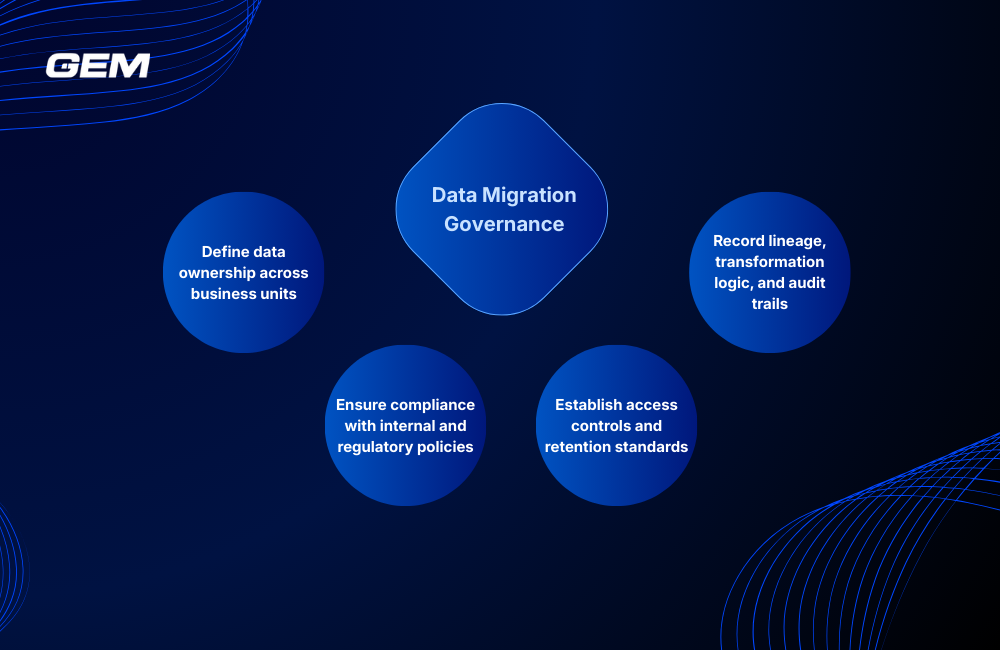
- Define data ownership across business units
Each data domain (finance, HR, customer, operations) should have a named owner responsible for defining quality standards, managing access, and validating post-migration accuracy. Ownership must extend beyond IT and include business stakeholders who understand how data is used in context. This reduces ambiguity when decisions are needed on data mapping, transformation rules, or retention policies.
- Record lineage, transformation logic, and audit trails
Enterprise migrations often span multiple systems, each with different metadata and transformation logic. Capturing end-to-end lineage, where the data originated, what rules were applied, and how it landed in the target system, is key to making migrated data trustworthy. This includes documenting ETL logic, field-level mappings, and any calculations or enrichments applied during the migration process. Audit trails should track who accessed or modified data at each stage.
- Ensure compliance with internal and regulatory policies
Migrations that involve personal data, financial records, or regulated systems must preserve the compliance posture of the source environment. This includes encryption rules, data masking, retention schedules, and access restrictions. Policies must travel with the data, particularly when moving to cloud platforms or consolidating multiple systems into one.
- Establish access controls and retention standards
Role-based permissions should be reviewed and reimplemented in the target environment. Migrating all data without reapplying access rules can expose sensitive records to the wrong groups. Retention policies, such as legal holds or archive schedules, need to be explicitly migrated or redefined. This prevents premature deletion of critical records or unnecessary over-retention that increases risk and cost.
Enterprise teams that manage governance effectively during migration typically:
- Assign domain-level data stewards with decision-making authority
- Maintain a knowledge base of mapping rules, transformation logic, and access policies
- Use lineage tools or metadata catalogs to trace data through systems
- Involve compliance officers in pre-migration planning and post-migration audits
Migrating Enterprise Data with ServiceNow
ServiceNow is a platform that drives operational workflows, automation, and reporting. When enterprise data needs to land in ServiceNow, the stakes are often higher than in conventional migrations.
Many migrations into ServiceNow happen during IT modernization, where legacy systems are decommissioned, and data is consolidated into a single operational platform. Common scenarios include onboarding new business units post-acquisition, consolidating tools across regions, or standardizing ITSM practices globally. In these cases, ServiceNow becomes the system of record for assets, incidents, change logs, and internal knowledge, making completeness and consistency of the migration essential.
Common use cases
- Asset data migration: Importing CI (configuration item) records from older ITAM systems into the CMDB, including ownership, lifecycle states, and vendor details.
- Incident history: Moving historical ticket records into ServiceNow to support reporting, analytics, and continuity.
- Knowledge base consolidation: Merging articles from multiple support portals into a unified, searchable repository.
Best practices for schema mapping, field-level validation, and dependency checks
- Align source data to ServiceNow’s schema, don’t force mismatched structures. Use Import Sets and Transform Maps to control data cleanly.
- Validate field constraints, such as required values, dropdown options, and foreign key references. Ensure imported data won’t break business rules or trigger unintended workflows.
- Check dependencies: data may connect to automation scripts, notification engines, or reporting dashboards. A misconfigured field can create operational noise or failures.

Lessons from the Field: Common Missteps and What to Learn from Them
Even with solid tools and experienced teams, enterprise migrations can go wrong, often in predictable ways. These are the patterns that recur most frequently, and the behaviors that separate reactive teams from successful ones.
Examples of poor planning, overlooked dependencies, or premature cutovers
- A multinational logistics firm began cutover before validating reporting dependencies. As a result, dashboards used by operations and finance teams failed on day one.
- An insurance company migrated customer data without syncing changes with the CRM team. This caused duplication of records and misaligned policy histories.
- A government agency skipped backup testing before go-live. When the migration failed mid-process, the fallback plan didn’t work, resulting in a multi-day outage.
What high-performing teams do differently
- They plan migrations as business programs, not just technical projects, engaging end-users, compliance teams, and downstream system owners from the start.
- They document decisions in real time – schema mapping, transformation logic, validation criteria, so that context isn’t lost when issues arise later.
- They use phased execution to isolate and resolve issues early. Each wave becomes a checkpoint for quality, not just progress.
- They review test results with business stakeholders, not just technical leads, to validate data in structure and context.
Indicators that a migration is going off-track, and how to correct course
- Testing cycles are shortened to avoid delays
- UAT is skipped or rushed
- Transformation rules are unclear or undocumented
- Error rates rise in test runs, but no root cause analysis is done
- Business users report inconsistencies post-migration that weren’t caught earlier
Are Inefficiencies Draining Your Resources? Let’s Fix That!
With GEM’s cutting-edge solutions, we’ll help you streamline workflows, optimize operations, and set your business up for sustainable success.
GEM Corporation – Data Services That Support Enterprise Change
GEM Corporation delivers structured, high-integrity data services that help enterprises migrate, integrate, and govern data across platforms without disrupting operations. Our teams manage complex transitions with a focus on control, traceability, and long-term usability.
Key service areas include:
- Enterprise Data Migration: We plan and execute migrations across cloud, hybrid, and on-prem environments, covering readiness assessments, transformation mapping, phased cutovers, and validation.
- ServiceNow Data Integration: As an official ServiceNow Consulting Partner, we support asset data onboarding, incident history imports, and CMDB population, working closely with platform owners to maintain automation and reporting integrity.
- Governance and Compliance Frameworks: Delivery is structured around ISO/IEC 27001:2022, ISO 9001:2015, and CMMI Level 3 standards, ensuring secure access control, documentation, and auditability.
With 400+ professionals and a delivery presence across Japan, APAC, and Europe, GEM brings discipline, tool expertise, and platform fluency to every data initiative.
Conclusion
Data migration risks and mitigation strategies are shaped by decisions made well before cutover through ownership clarity, platform alignment, structured testing, and active governance. Projects that succeed combine cross-functional planning with real-time validation, treating migration as both a technical and operational shift. GEM Corporation supports enterprises through this complexity with tested frameworks, platform expertise, and disciplined execution.
Contact GEM to discuss how we can support your next data initiative.
How should organizations structure ownership during migration?
Ownership should be tied to business domains, not just IT systems. Assigning data stewards for finance, HR, customer, and product domains helps ensure that transformation decisions, access rules, and validation criteria align with how the data is actually used. This structure supports faster issue resolution and clearer accountability during cutover and post-migration review.
What steps help preserve compliance during migration?
Start by identifying regulated datasets early. Then confirm that masking, encryption, access control, and retention policies are applied at every stage - extraction, transformation, and load. Work with compliance and legal teams to validate that the destination environment can support the same controls, especially when migrating to cloud or cross-border platforms.
How can teams tell if a migration is going off-track?
Early signals include mounting data defects, inconsistent documentation, skipped stakeholder reviews, or user confusion on what data will be available. Teams that correct course early typically pause upcoming waves, hold structured retrospectives, and re-align on scope and validation priorities.
What distinguishes high-performing migration teams?
They treat migration as a business program, not just a technical task. These teams document decisions in real time, coordinate across engineering, compliance, and business units, and execute in phases with active validation. They also maintain clear escalation paths and shared ownership across the migration lifecycle.