




Cyber threats are evolving fast, and so are the tools designed to stop them. With more Australians working, shopping, and storing data online, the need for reliable protection is growing. In fact, over 87,400 cybercrime reports were made to the ACSC in the 2023-2024 financial year. This article breaks down the top 10 options for anyone searching for the best antivirus in Australia in 2025. We’ve reviewed the latest features, pricing, and support options that matter most. Whether you’re securing a personal device or a small business network, here’s what to know before choosing your next antivirus software.
What is Antivirus Software?
Antivirus software is a type of program designed to detect, block, and remove malicious software from computers and other connected devices. It scans files, applications, and websites for patterns linked to known threats such as viruses, ransomware, spyware, and trojans. Some antivirus programs also include real-time monitoring, which helps identify suspicious behavior before damage occurs.
Modern tools often combine traditional signature-based detection with newer methods like behavioral analysis and machine learning. These updates help the software stay responsive to new and modified threats. Antivirus tools are commonly used across personal, business, and public-sector systems to maintain digital safety.
The Demand for Antivirus Software in Australia
Australia’s cyber threat landscape is becoming more complex year by year, and the numbers reflect it.
According to government data, the Australian Cyber Security Centre (ACSC) received over 36,700 calls to its Cyber Security Hotline – an increase of 12% from the year before. Over 1,100 cybersecurity incidents were escalated, with a notable 11% involving critical infrastructure – a reminder that cybercrime now affects not just businesses, but essential services.
For businesses of all sizes, the risks are material. Small businesses reported average losses of $49,600 per incident, while individuals faced losses of $30,700, a 17% increase year over year.
These aren’t just technical problems, they’re operational risks. Email-based threats, in particular, now bypass basic protections and require more proactive defence, including:
- Multi-factor authentication (MFA)
- Email content filtering
- Staff training to spot phishing attempts
- Domain protection strategies
Top 10 Antivirus Software in Australia (2025 Updated)
We have compiled a list of the best antivirus software Australia for 2025. These products encompass a wide range of features suitable for both businesses and individual users.
-
Bitdefender
Bitdefender has earned consistent praise from independent testing labs for its multi-layered approach to threat detection. The Antivirus Plus edition blocks ransomware, phishing, and emerging malware using behavioral monitoring and a cloud-based scanning engine. It also includes Safepay, a secure browser for financial transactions, and a robust anti-tracker module for added online privacy.
Why we picked it:
Bitdefender operates quietly in the background, offering real-time protection without disrupting your workflow. The Total Security plan expands coverage to five devices and includes tools for device optimization, microphone monitoring, and anti-theft features, particularly useful for users managing both personal and work data on the go.
Who should use it:
Ideal for users who want a set-and-forget antivirus that doesn’t interfere with performance. Also a good match for households or individuals managing several devices across platforms.
-
Norton
Norton has built a reputation over three decades for reliability and depth. Its Antivirus Plus plan includes real-time threat protection, a smart firewall, and cloud backup for Windows PCs. Higher-tier packages extend into dark web monitoring, parental controls, and VPN access. Norton’s threat detection engine consistently ranks among the top in third-party assessments.
Why we picked it:
Norton blends traditional antivirus features with identity protection and system resilience. Its Virus Protection Promise – a guarantee that Norton experts will help resolve malware infections – adds another layer of assurance, especially for small businesses handling sensitive data.
Who should use it:
Well-suited to small business owners and families managing up to 20 devices. Also a strong option for users seeking identity monitoring tied to their antivirus platform.
-
McAfee
McAfee’s Total Protection package covers antivirus, firewall, identity monitoring, and a secure VPN in one subscription. The platform also includes encrypted storage for sensitive files and a browser extension that warns against risky websites. Its integrated password manager and parental controls make it a practical choice for shared devices.
Why we picked it:
McAfee’s strength lies in centralised control. The user dashboard makes it easy to manage multiple devices and monitor performance, and its automated scans don’t interrupt your daily tasks. Protection scales easily from one device to five or more, depending on the plan.
Who should use it:
Best for users who want security coverage across a mix of devices but don’t want to spend time configuring settings. Also suitable for households with children or shared workstations.
Read more:13 Types of IT Services That Can Transform Your Business in 2025
-
Avast
Avast One Basic offers real-time antivirus protection with additional features like a basic firewall, ransomware shields, and a built-in VPN with limited bandwidth. Free users also get access to a privacy advisor and software updater. Avast’s cross-platform support covers Windows, macOS, Android, and iOS, with consistent lab-tested performance across each.
Why we picked it:
Avast’s free plan includes more features than many paid competitors, making it particularly useful for users just starting to build their security stack. It also supports remote device management from a single dashboard, which is valuable for dispersed teams or families.
Who should use it:
A fit for remote teams, mobile-first users, and small businesses looking to protect more than 10 devices without committing to a premium license upfront.
-
Avira
Avira’s antivirus engine is backed by real-time cloud scanning and heuristic analysis. The software includes a firewall, phishing protection, and browser safety tools. Free users get access to a limited VPN and password manager. Premium plans unlock advanced web protection, email security, and system performance tools.
Why we picked it:
Avira offers strong protection without complexity. The interface is clean, and the automated scans are fast. It’s also lighter on system resources than many of its competitors, making it suitable for older hardware.
Who should use it:
A practical choice for casual users or students who want solid malware protection without additional system load. Also a good fit for budget-conscious buyers who want core security features at a lower entry point.
Are Inefficiencies Draining Your Resources? Let’s Fix That!
With GEM’s cutting-edge solutions, we’ll help you streamline workflows, optimize operations, and set your business up for sustainable success.
-
Malwarebytes
Malwarebytes started as a cleanup tool for infections that traditional antivirus software missed. It has since evolved into a full-featured security platform with robust real-time protection. The Premium edition introduces layered defences, including behaviour-based detection, ransomware monitoring, and exploit mitigation. Malwarebytes performs fast scans and blocks threats before they reach your system, without relying solely on signature matching.
Why we picked it:
Malwarebytes stands out for its ability to detect both known and unknown threats, making it a strong fallback even when other tools fail. It’s also one of the few platforms that focuses equally on prevention and remediation. Its lightweight interface and flexible deployment options make it a practical choice across both home and business environments.
Who should use it:
Business users, IT teams, and anyone who’s previously relied on Malwarebytes Free to recover from infections. Also recommended for users seeking a second layer of defense alongside existing endpoint protection.
-
Microsoft Defender
Built into Windows 10 and 11, Microsoft Defender has quietly become a competitive antivirus solution. Over the past few years, it has improved detection rates, added ransomware protection, and expanded into cloud-based threat intelligence. Defender now includes browser control, firewall integration, and system health reporting, all without requiring a separate installation.
Why we picked it:
Microsoft Defender offers native integration with the Windows operating system and is automatically updated through Windows Update. It performs consistently in third-party lab tests and is a strong baseline option for users who don’t want to manage a separate antivirus subscription.
Who should use it:
Home users and small businesses running Windows who want core protection without additional cost or configuration. A practical solution for those who prefer built-in tools and minimal system overhead.
-
Webroot Essentials
Webroot takes a cloud-first approach to antivirus, using real-time threat intelligence to guide its lightweight local agent. It virtualises unknown programs, monitors their behaviour in a secure sandbox, and rolls back any changes if a threat is confirmed. The software installs in seconds and uses minimal system resources.
Why we picked it:
Webroot’s small footprint makes it ideal for older systems or users prioritising speed. Its layered defense includes ransomware rollback, phishing protection, and cloud-based scanning. The inclusion of LastPass password manager adds extra value for users managing digital identities across platforms.
Who should use it:
Recommended for users with limited system resources, remote professionals relying on older hardware, or small teams that need fast deployment with minimal maintenance.
-
G Data Antivirus
With a legacy dating back to the 1980s, G Data brings decades of threat expertise to its antivirus engine. It uses a dual-engine approach, combining signature-based scanning with behavioural analysis. The software includes real-time monitoring, email protection, and exploit detection, with a straightforward interface built for non-technical users.
Why we picked it:
G Data offers a strong core feature set at a competitive price point. While it doesn’t lead in benchmark tests, it delivers consistent results and includes features typically reserved for higher-tier plans. Its transparent pricing and low system load make it a dependable alternative to more complex suites.
Who should use it:
Users looking for reliable performance without feature overload. A practical option for individuals or small businesses that want protection without navigating a steep learning curve.
-
Emsisoft
Emsisoft is built for environments where precision matters. It combines real-time file scanning, behaviour blocking, and web protection into a single console. Machine learning is used to detect zero-day exploits, and the system’s centralised management dashboard lets you monitor devices across locations. Emsisoft also blocks malicious websites before threats can reach the endpoint.
Why we picked it:
Emsisoft’s strength lies in its proactive approach to unknown threats. The software is designed for businesses that can’t afford downtime or data compromise. The cloud dashboard and customisable policies make it a strong fit for teams managing multiple endpoints.
Who should use it:
Organisations that need central management, ransomware protection, and real-time analysis. Also suited for tech-forward users who prioritise early detection of zero-day threats.
Factors to Consider when Choosing Antivirus Software in Australia
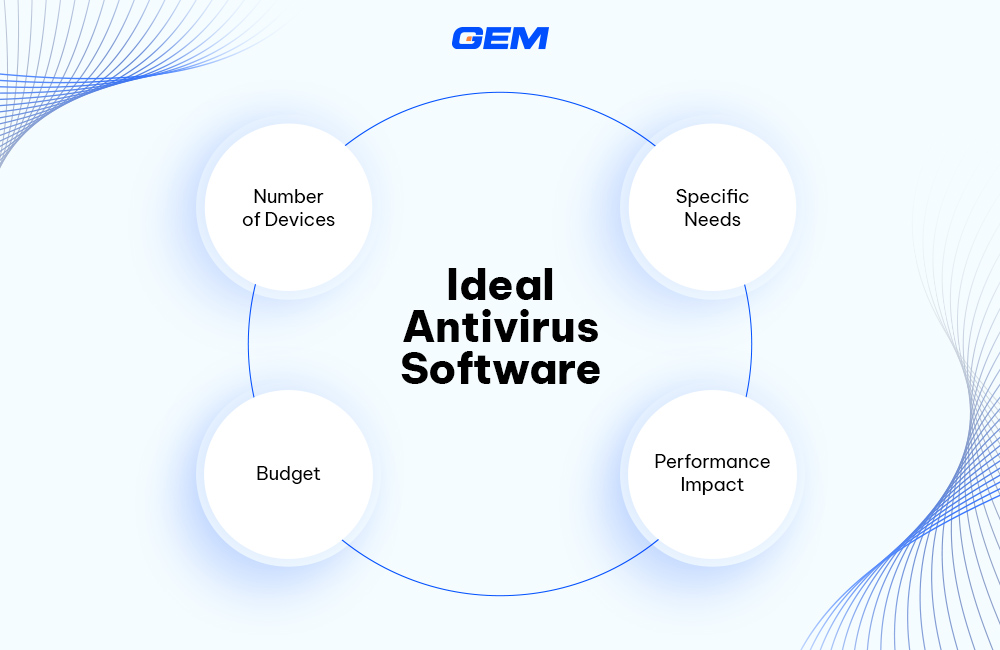
When choosing the best value antivirus software in Australia, the decision often goes beyond brand recognition or feature lists. It comes down to how well the product fits your specific context, whether you’re an individual, a family, or a business operating across multiple devices.
Number of Devices
Many antivirus providers offer multi-device plans, but the coverage varies widely. If you’re securing just one personal laptop, a basic plan may be enough. But households with several users, or businesses running across desktops, mobiles, and tablets, will need software that supports multiple device types under one license. It’s worth checking whether the software offers consistent protection across operating systems, including Windows, macOS, Android, and iOS.
Specific Needs
The right antivirus solution depends heavily on your use case. For individuals, identity theft protection or safe browsing tools might be a priority. Small businesses may look for email security, ransomware detection, and integration with cloud platforms. If you’re in a regulated industry like healthcare or finance, look for antivirus tools that align with compliance standards and offer detailed reporting features.
Budget
Pricing models vary between annual subscriptions, per-device charges, and bundled security suites. Some products offer free versions with limited features, which might suit light users. For those handling sensitive data or managing multiple endpoints, premium plans offer broader protections and faster support response times. It’s worth comparing long-term value, not just the upfront cost.
Performance Impact
Antivirus software runs in the background, but some tools consume more system resources than others. This can affect boot times, application performance, and even internet speed. Lightweight solutions may be a better fit for older machines or users who rely on high processing power for tasks like design, gaming, or development. Many providers offer trial versions, which can help test compatibility before committing.
The best antivirus in Australia is the one that matches both your risk profile and your day-to-day usage.
Read more: Protect your business — check out our Security Testing service now
Is It Feasible to Build Your Own Antivirus Solution?
Building an antivirus solution from the ground up is technically feasible, but few businesses should pursue it without a clear strategic rationale, budget runway, and access to deep security expertise. Antivirus software is more than a scanning engine. It involves real-time threat detection, cloud-based intelligence, behavioural analysis, and extensive compatibility testing across platforms. This level of capability takes sustained investment in R&D, regulatory compliance, and threat intelligence operations.
The development process also introduces complexity. At a minimum, an antivirus solution must integrate with system-level APIs, process file signatures securely, and respond to live threats without degrading device performance. Maintaining this over time, while staying aligned with evolving malware trends and operating system updates, requires a dedicated team.
For some, the goal isn’t to replace commercial antivirus software entirely, but to develop a tailored solution for a specific use case. This could be a lightweight threat-detection module for proprietary systems, or endpoint controls that align with internal compliance frameworks. In such cases, building a custom antivirus component may be justified, but only when driven by a clear business need.
This is where working with an experienced IT service partner becomes valuable.
Beyond Antivirus: Practical Steps Businesses Can Take to Prevent Malware
Antivirus software plays a foundational role in any cybersecurity strategy, but it’s only one part of a broader defence plan. Businesses operating in Australia, especially those handling sensitive data or operating across digital platforms, should consider additional layers of protection to reduce exposure and limit system vulnerabilities.
- Apply Multi-Factor Authentication (MFA)
Credential theft remains a common entry point for malware. MFA adds an extra layer of verification, making it harder for attackers to access systems using compromised passwords.
- Train Staff to Spot Phishing and Social Engineering
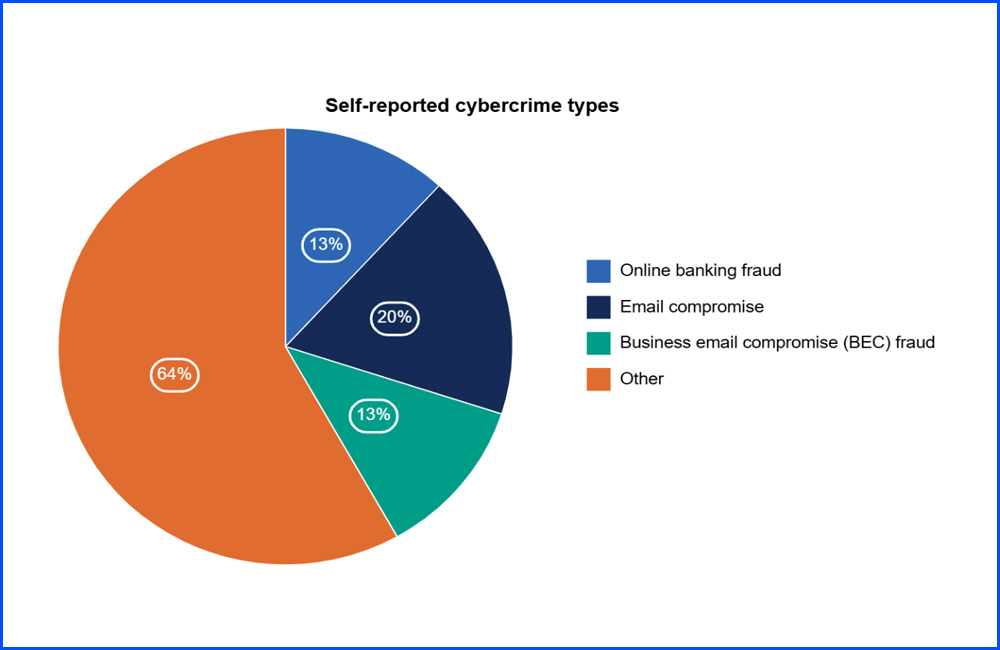
Email compromise accounts for one in five self-reported cybercrime incidents in Australian businesses. Continuous training helps employees identify suspicious messages, links, and requests before they lead to a breach.
- Keep Software and Operating Systems Updated
Outdated systems often contain unpatched vulnerabilities. Regular updates, including third-party applications and browser plugins, help close attack paths used by malware.
- Restrict Administrative Access
Limiting admin privileges to only those who require them reduces the risk of widespread compromise in the event of a breach.
- Monitor Network Activity
Implementing detection systems that flag unusual behaviour can help intercept malware early. This includes traffic anomalies, unexpected file transfers, or unrecognised devices connecting to the network.
Regulatory Frameworks That Support Safer Practices
Businesses looking to formalise their approach to malware prevention can refer to two key standards:
- ISO/IEC 27001: A globally recognised framework for implementing and managing an information security management system (ISMS). It outlines structured controls for risk assessment, access control, and incident response.
- Australia’s Essential Eight (by ACSC): A baseline set of mitigation strategies designed to reduce cyber threats. These include patch management, application control, and user access restrictions, all relevant in a malware prevention context.
Both frameworks can guide internal policy development and offer a reference point for compliance audits or procurement requirements.
Safeguarding Your Business System with GEM Corporation

GEM Corporation is a global technology consultancy that specialises in secure, scalable software development. With more than 400 experts and a track record of over 300 successful projects across markets, including Australia, GEM supports businesses through each stage of secure product development, from architecture planning and security testing to AI-driven threat detection tailored to industry-specific risks.
Partnering with GEM allows organisations to focus on core operations while delegating complex engineering and security layers to a trusted team. GEM’s engineers can design and build specific modules, such as behavioural scanning tools, endpoint protection layers, or cloud-integrated dashboards aligned with your threat landscape and compliance requirements. These can be delivered as part of a custom software development engagement or integrated into application modernization initiatives.
Developing antivirus capabilities may serve a niche purpose within certain industries, but it’s rarely a solo project. With the right partner and a targeted scope, custom solutions can complement standard tools. For teams prioritising test coverage and system resilience, GEM also offers automation testing and end-to-end QA services to validate security layers before deployment
Read more: Explore the Top AI Companies in Australia for 2025
Takeaways
Choosing the best antivirus in Australia depends on your risk profile, device environment, and how much control you want over your security. From real-time protection and ransomware rollback to enterprise-grade dashboards, today’s top platforms offer more than just virus scans. Whether you’re managing a single PC or a distributed team, effective protection starts with the right match. To explore tailored cybersecurity strategies or custom endpoint solutions, contact the team at GEM Corporation.
Do I still need antivirus if I already use Microsoft Defender?
Microsoft Defender offers solid baseline protection, especially for Windows users. But for businesses or high-risk users, third-party antivirus tools often offer more advanced features like sandboxing, behavioural detection, and real-time threat intelligence hat go beyond Defender’s default scope.
Which antivirus software is best for small businesses in Australia?
Bitdefender and Emsisoft are often preferred by small businesses due to their strong malware detection, lightweight performance, and multi-device management capabilities. Both also offer Australian-based support or region-optimised settings.
What should I consider when choosing antivirus software?
Key factors include:
- Threat detection accuracy and speed
- System performance impact
- Device compatibility (Windows, macOS, Android, etc.)
- Cloud-based management (for teams)
- Customer support availability in Australia
- Integration with broader security tools (e.g., VPNs, firewalls)
Can I build a custom antivirus solution tailored to my business?
It’s possible, especially if your organization has specific needs or operates in a regulated sector. But building from scratch is resource-intensive. A more practical approach is to work with a technology partner like GEM to develop targeted modules (e.g. behavioral scanning, endpoint monitoring) that complement existing antivirus tools without replacing them entirely.